
Adding text to models can be very useful; especially if as you develop a design item they are labeled with their description and source (eg website).
The label tool is SU allows a simple label to be added but it hovers in 3D space and only the leader is fixed to a surface or object. These labels need to be controlled by creating and adding them to a tag. The text remains the same size no matter how much you scroll, which can be frustrating
Curic (a developer of SU extensions) has a simple extension called single-line text which allows text to be placed onto a surface as an object, it costs $21. This is much easier and decreet and allows a wide range of objects to be identified without intruding into the model space
An alternative is ThomThom’s 3D text editor (free) from the Extension warehouse. A very simple extension that allows text to be placed on a face. Text can have depth or be set to “0” for a simple outline.
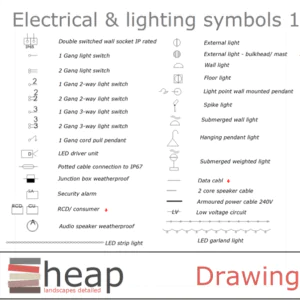
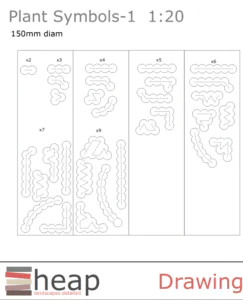
Within Layout is a library of unique symbols and graphics: Scrapbooks. These can be anything from a symbol to represent a spot height to an elevation of a BBQ or as abstract as a stylized treeline to site in the background of a drawing. Scrapbook pages are invaluable for creating drawing sets. They let you drag and drop symbols, they can be resized, coloured and edited in any way.
There are several short videos explaining how to use Scrapbooks:
https://www.youtube.com/watch?v=3cxT8oGlB0U
https://www.youtube.com/watch?v=W4uis1BVB2s
https://www.youtube.com/watch?v=QCKdsBhMLPQ&t=113s
I have many custom pages from North Symbols, electrical symbols to planting clusters
You have probably seen that the new Shoot Garden planner for SketchUp is now available (see the Extension store) The basic version is £67/mnth or £804/yr. If I did a lot of plant plans it would be worth considering, but as my focus is on construction it is not something that I will use. Reassuring that Shoot sees enough value in the designers who are SketchUp users.